
Views: 0 Author: Site Editor Publish Time: 2025-10-31 Origin: Site
Kaer, established in 1996, is a leader in the communication terminal industry. Kaer produces reliable SIP phone solutions and other innovative products. Kaer continues to develop new technologies to help offices work more efficiently and stay better connected.
SIP phones make calls using the internet. They let people use voice, video, and messaging. Regular phones do not have these features.
Using SIP phones can help companies save half their phone costs. It is easy to add more phones without buying new equipment.
SIP technology helps people work from home or anywhere. Workers can talk and share ideas if they have internet.
SIP phones can work with business tools like CRM and project software. This helps teams work together and get more done.
Picking the best SIP provider is very important. You must check if it works with your current systems. This helps everything run well.
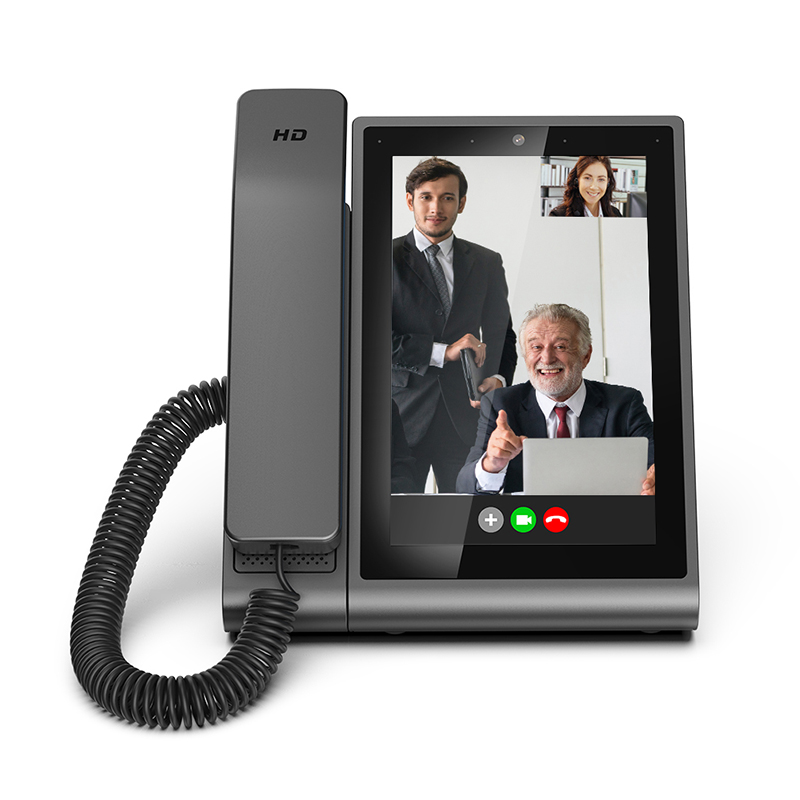
A sip phone lets you make calls using the internet. You do not need old phone lines. You can use it for voice calls, video chats, and instant messages. The Session Initiation Protocol, or sip, is the main technology. It is a set of rules that helps phones connect online. With a sip phone, you get clear sound, lower costs, and cool features. These features are not found in regular phones. Many offices pick sip phones because they are simple to set up. You can use a device that looks like a normal phone. You can also use an app on your computer or phone. Some companies use adapters to make old phones work with sip.
Tip: If you want to save money and get new features, switching to a sip phone or deskset sip phone is a smart idea.
You might wonder how sip phones work. First, you pick up your sip phone or deskset sip phone and dial. Your device sends an INVITE message to a sip server. The server finds the person you want to call. It sends the message to their sip phone. Their phone rings, and they answer. Both phones agree to start the call. Your voice or video travels over the internet as digital data. You use your current internet connection. You do not need extra phone lines.
Here is a simple breakdown of how sip phones work:
Your sip phone sends an INVITE request to the sip server.
The server forwards the INVITE to the other person's sip phone.
The other phone responds, and both phones set up the call.
Your voice or video travels over the internet using digital streams.
This process makes it easy to add new users or features. You do not need new wires or special workers. You can manage everything through your network.
You may ask how a sip phone or deskset sip phone is different from a regular phone. The biggest difference is how they send your voice. A sip phone uses the internet and turns your voice into digital data. A regular phone uses copper wires and sends your voice as an analog signal. This change brings many benefits.
Feature | SIP Phones (VoIP) | Traditional Phones (Landline) |
|---|---|---|
Mode of Transmission | Uses internet to transmit voice as digital data | Uses copper wires to transmit analog signals |
Cost | Generally lower long-distance rates | Higher costs for multiple lines and services |
Features | Advanced features like video calling, CRM integration | Basic features like caller ID and voicemail |
Scalability | Easily scalable and flexible | Limited scalability, often requires new lines |
Reliability | Dependent on internet connection | Reliable, independent of internet connectivity |
Transmission Method: A sip phone uses your internet connection. A regular phone uses wires.
Cost: You can save money with a sip phone, especially for long-distance calls.
Features: A sip phone or deskset sip phone gives you video calls, voicemail to email, and mobile app integration.
Scalability: You can add new users or lines quickly with a sip phone. Regular phones need new wires and hardware.
Reliability: A regular phone works even if the internet goes down. A sip phone needs your network to work.
Note: Offices that want to grow or support remote work often pick sip phones for their flexibility and cost savings.
Kaer started in 1996 and is now a global leader in communication terminals and solutions. Kaer has over 28 years of experience. Kaer makes stable, smart, and efficient products. These include sip phones, deskset sip phone models, 4G smart watches, student GPS trackers, and public communication equipment. Kaer has three R&D centers and holds many patents. Kaer keeps making new things. The company’s mission is to help people communicate better and support digital change. If you choose Kaer, you get a trusted partner who helps your business succeed in the digital age.
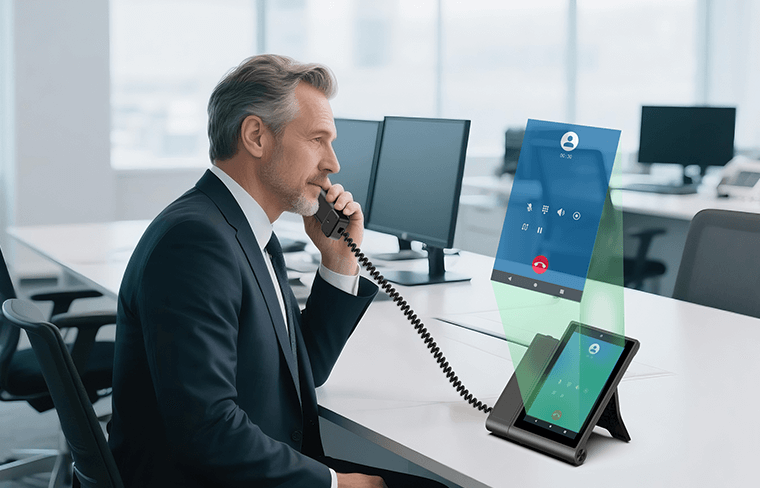
You can use sip phones in lots of ways at work. These devices are good for talking at your desk. They also help with mobile and remote work. Many offices use wireless sip handsets. These let workers walk around and still talk to others. Softphones are apps that work like sip phones on computers or phones. This makes it easy to call from anywhere. You can stay in touch at your desk or at home.
Here is a table that shows how people use sip and voip phones in offices:
Practical Use Case | Description |
|---|---|
Corporate desk phones | Direct communication at your workstation. |
Mobile softphones | Make calls from any device with internet access. |
Wireless SIP handsets | Stay connected while moving around the office. |
Home phones | Extend office communication to your home. |
Legacy office phone systems | Upgrade old systems with sip features. |
Remote workers | Support employees working from different locations. |
Contact centers | Handle high call volumes efficiently. |
Flexible cloud solutions | Scale communication as your business grows. |
Sip and voip phones help you with calls, messages, and video meetings. You can use them at home, in contact centers, or anywhere with internet.
Sip phones do more than just make calls. You can connect them to business tools. For example, you can link your sip or voip phone with project management software. This helps your team talk and track tasks faster. You can also connect sip phones to email and calendar apps. This makes it easy to plan meetings and send updates.
Many offices use sip phones with CRM systems. This helps you keep customer info and track calls. You can also use sip phones with chat tools like Slack or Microsoft Teams. This lets you call, chat, and share files in one place. Help desk platforms also work well with sip phones. This makes customer support easier.
Sip technology lets you use voice, video, and instant messages at the same time. This helps your team make choices fast and manage projects better.
Sip and voip phones help with remote and hybrid work. You can work from anywhere with internet. This helps you get work done at home, in the office, or on the go. Sip phones have features like call forwarding, voicemail, and HD voice. These tools help you not miss important calls.
Here is a table that shows how sip phones help remote and hybrid teams:
Feature/Benefit | Description |
|---|---|
Flexibility & Mobility | Work from any location with internet access. |
Enhanced Collaboration | Communicate with your team or clients from anywhere. |
Enhanced Productivity | Set up and use sip phones quickly. |
Cost-Effectiveness | Lower phone bills and maintenance costs. |
Scalability | Add or remove phones as your team changes. |
HD Voice Quality | Enjoy clear audio for professional calls. |
Advanced Call Handling | Use features like call forwarding and voicemail. |
Security | Protect your calls and data with strong security measures. |
User-Friendly Interface | Easy to use, even for new users. |
Sip and voip phones help you stay in touch and work well anywhere.
Tip: If you want a system that is reliable and flexible, sip and voip phones are a smart pick for any office.
Kaer started in 1996 and is a leader in communication terminals. With over 28 years of experience, Kaer makes stable and efficient products. These include sip phones, 4G smart watches, student GPS trackers, and public communication equipment. Kaer has three R&D centers and many patents. The company works on new ideas and cares about customers. Kaer helps businesses and people do well in the digital age.
When you pick sip phones for your office, you have three choices. These are hardphones, softphones, and deskset sip phones. Each type works best for different jobs and people.
Hardphones are real phones that sit on your desk. You use them like normal phones, but they connect to the internet with sip. These phones give you clear calls and are simple to use. Hardphones are good if your office needs strong voice calls every day. Some models, like Polycom VVX 450 and Yealink T33G, have HD sound and support many lines.
Softphones are apps you put on your computer or phone. You use them to call, send messages, and join video meetings. Softphones are great for remote teams or people who travel a lot. You can use them anywhere with internet. Softphones cost less because you do not need extra devices. You can also add new users fast.
Here is a table to help you compare these sip phones:
Features | Hardphones | Softphones |
|---|---|---|
Cost | Higher first cost | Lower; no device needed |
Mobility | Stays in one spot | Easy to move |
Call Quality | Clear HD voice | Depends on internet |
Setup | Needs to be installed | Quick app setup |
Scalability | Needs more devices | Easy to add people |
Maintenance | Needs care for devices | Needs little care |
Tip: Softphones are flexible for teams who travel or work from home. Hardphones are better if you want strong call quality.
Deskset sip phones are special sip phones for your desk. They often have extra features. These phones are good for small businesses that want easy setup and low costs. Deskset sip phones may need some tech skills, but they give you tools like call analytics and better VoIP connections.
You can find deskset sip phones like Grandstream GRP2612W and Fanvil X7A. These phones support many sip lines and have color screens. They help you handle calls and messages easily.
Here is a table to show how deskset sip phones compare to other sip phones:
Feature/Aspect | Deskset SIP Phones | Other Types (IP Phones) |
|---|---|---|
Scalability | Good for small offices | Better for big companies |
Cost-effectiveness | Lower care costs | Extra features may save money later |
Advanced Features | Call analytics, easy VoIP setup | Video calls, work tools |
Technical Expertise | May need special setup | Easier for most people |
When you pick sip phones, think about your office size, budget, and how your team works. You can use hardphones, softphones, and deskset sip phones together to fit your needs.
Kaer has been a leader in communication terminals since 1996. Kaer gives you smart, stable, and efficient sip phones. The company has three R&D centers and many patents. Kaer helps offices everywhere with new ideas, like sip phones, smart watches, and GPS trackers. You can trust Kaer to help your business grow in the digital age.
Sip phones have many features that help your office talk better. You can make HD voice calls and join video meetings. You can also send instant messages to your team. Many sip phones let you forward calls to others. You can put calls on hold with or without music. Conference calling lets many people talk at once. Auto-attendant helps send calls to the right person. Shared call appearance lets your team handle calls together. You can use your sip phone on your phone or computer.
Advanced call forwarding
Hold (with or without music)
Conference calling
Auto-attendant
Shared call appearance
Mobile & desktop app integration
HD phone calls
Call recording
Customer caller ID
Video sip phones help you see and talk to clients and remote teams. These phones often have HD video and touchscreens. They work with tools for video meetings. You can record calls to check quality. Analytics help you see how calls are going. CRM integration keeps customer info in one place. IVR helps send calls to the right person fast.
Tip: Using features like call recording and analytics can help your team do better and give better service.
Sip phones work well if your network is set up right. You should use a strong internet connection and good routers. Good network gear helps keep your calls clear. Check your network often for problems like lag or delay. Backup power, like UPS, keeps your phones working if the power goes out. Update your software often to stay safe and work better. Regular checks help you find and fix issues fast.
Reliability Strategy | Benefit |
|---|---|
Wired internet connection | Stable calls |
QoS network equipment | Prioritizes voice traffic |
Backup power (UPS) | Prevents call disruptions |
Regular updates | Improves security and quality |
System audits | Maintains high performance |
Note: Good security, like VLANs and SIP firewalls, keeps your sip phone system safe from threats.
Sip phone features help your business grow easily. You can add new phone lines in just a few minutes. You do not need extra hardware for new places. Cloud services lower the cost to keep things running. You know what you will pay each month. Using less bandwidth saves money and keeps calls clear.
Elimination of per-line infrastructure costs
Reduced maintenance and support expenses
Geographic expansion without extra hardware
Predictable scaling costs
Bandwidth efficiency savings
Quick deployment of new lines
Overcoming traditional system limitations
Switching to sip can help your company save money. VoIP can cut your phone bills in half. Small businesses can start for much less money. Most companies save 30% to 50% on phone costs. You can also save time, with businesses getting back about 32 minutes each day.
Statistic Description | Savings Percentage/Time Saved |
|---|---|
VoIP can cut company phone bills in half. | Up to 50% |
Small businesses can slash their starting costs by up to 90%. | Up to 90% |
Businesses usually save 30% to 50% on their phone costs with VoIP. | 30% to 50% |
Small businesses save about 32 minutes each day with VoIP. | 32 minutes |
Callout: Sip phone features help you save money, grow your system, and get more done.
Kaer started in 1996 and is a top company in communication terminals. With over 28 years of experience, Kaer makes smart and stable products. These include sip phones, smart watches, GPS trackers, and public equipment. Kaer has three R&D centers and many patents. This means you get new and helpful solutions. The company wants to help you talk better and do well in the digital world.
Some people think SIP and VoIP mean the same thing, but they do not. SIP stands for Session Initiation Protocol. VoIP means Voice over Internet Protocol. Both let you make calls online, but they work differently.
SIP is a set of rules for starting and ending calls. It also helps with ringing, moving calls, and adding video or messages. VoIP is a bigger idea for sending voices over the internet. SIP is one way to use VoIP, but there are others.
Here is a table that shows how SIP and VoIP are different:
Feature | SIP | VoIP |
|---|---|---|
Type | Protocol for managing multimedia sessions | Broader technology for voice transmission |
Flexibility | Handles voice, video, and messaging | Focuses mainly on voice |
Functionality | Signaling for multimedia | Transmits voice data |
Extra Features | Video calls, file sharing, chat | Mostly voice calls |
SIP lets you set up video meetings, send messages, and share files. VoIP is the base for making calls online. SIP gives you more features and control.
Note: SIP has more options than basic VoIP. If you want video, chat, or file sharing, SIP is the better pick.
SIP trunking links your office phones to the internet. It replaces old phone lines with a digital connection. With SIP trunking, your calls turn into digital data and travel online. This makes your phone system more flexible and saves money.
Many companies use SIP trunking because it lets you handle many calls at once. You can add or remove lines as your team changes. A 2024 survey says about 65% of North American companies use SIP trunking. The SIP trunking market keeps growing because it helps companies change size fast.
SIP trunking connects your phones to your internet phone provider.
You do not need old phone wires anymore.
You can handle more calls during busy times without new equipment.
Tip: SIP trunking helps you save money, stay flexible, and keep your calls safe.
When you get SIP phones for your office, check if they work with your current systems. Some old phone systems do not support SIP trunking. You might need a VoIP gateway to connect them. Always pick a SIP provider that works with your equipment and software.
Compatibility Issue | What to Check |
|---|---|
Existing PBX systems | May need a gateway for SIP trunking |
WebRTC integration | Legacy SIP may not support new web standards |
Provider interoperability | Pick a provider with strong compatibility |
You should check your network and devices before you switch. Upgrading your system helps you use all the features of SIP and VoIP. This way, you avoid problems and get the most from your new phones.
Callout: Good planning helps you avoid problems and makes your move to SIP and VoIP easy.
Kaer started in 1996 and is a leader in communication terminals and solutions. With over 28 years of experience, Kaer makes stable and smart products like SIP phones, 4G smart watches, student GPS trackers, and public payphones. Kaer has three R&D centers and many patents. The company works on new ideas and cares about customers. Kaer wants to help you talk better and do well in the digital world.
SIP phone benefits help your office be flexible and ready for changes. You can use SIP phones for voice calls, video, and messages. These phones help you save money and work from anywhere. They also make it easy to grow your business. The table below shows why SIP phones are good for the future:
Feature | Description |
|---|---|
Adaptability | SIP phones keep working with new technology. |
Integration | You can connect SIP phones to AI, 5G, and IoT devices. |
Cost Efficiency | SIP phones cost less than old phone systems. |
Scalability | You can add more phones as your business grows. |
You get clear calls, strong security, and easy setup with SIP phones. SIP phone benefits include saving money, being flexible, and moving around. You can make calls from anywhere and use different devices. When picking a SIP phone or provider, check for good voice quality, security, and coverage. Make sure the system fits your call needs and supports DID numbers.
Tip: Teach your team, check what tech you need, and pick a provider with good help. Always think about both cost and long-term value.
Kaer has helped offices since 1996. The company offers SIP phones, smart watches, and GPS trackers. Kaer uses new technology and has three R&D centers. You get stable products and expert help. Kaer cares about new ideas and customers, making it a trusted partner for your business.


