
Views: 0 Author: Site Editor Publish Time: 2026-04-29 Origin: Site
Screens, apps and internet access often dominate discussions about safe phones for children. But before comparing any of those features, there is a more immediate question: who can communicate with the child?
A phone may limit the numbers a child can dial while continuing to accept calls from unknown numbers. Another may display a short contact list but still allow changes through an unprotected settings menu. In both cases, the communication boundary is less controlled than it initially appears.
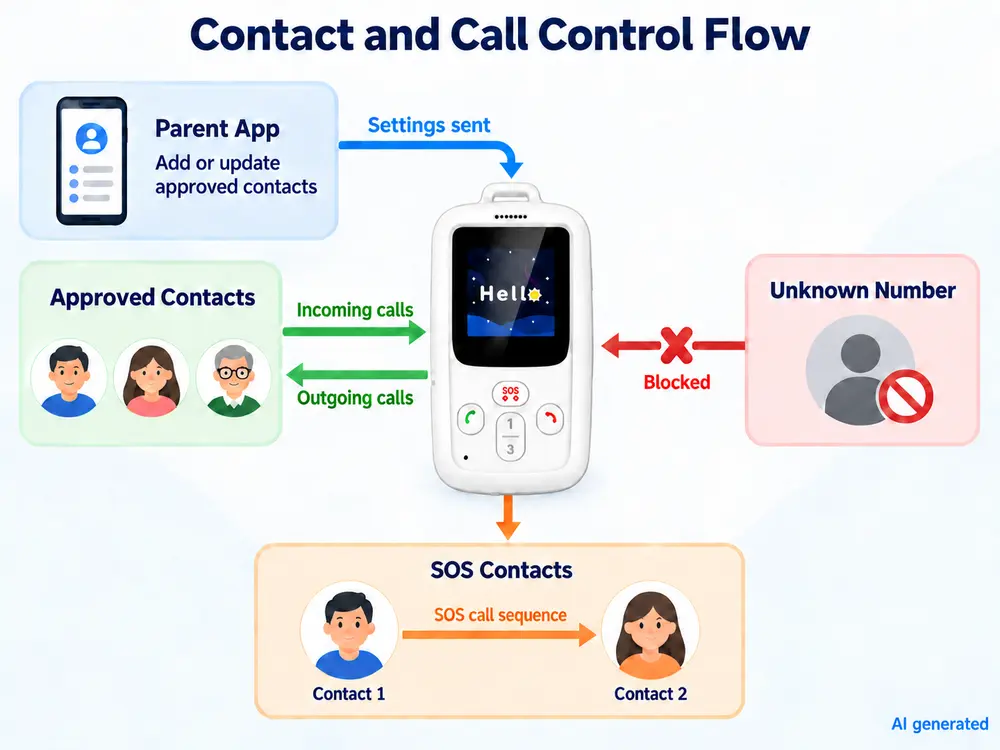
A kids phone with approved contacts should manage the entire calling process—not just the names displayed on the screen. This includes incoming and outgoing calls, administrator permissions, remote updates, scheduled restrictions and emergency calling.
These details matter to families choosing a first phone. They become even more important when telecom operators, schools or service providers need to configure and support multiple devices.
Approved contacts are phone numbers or accounts that are permitted to communicate with the child’s device. The feature may also be described as an allowed-contact list or, in more technical documentation, a whitelist.
A typical list might include:
parents or guardians;
grandparents;
another authorized caregiver;
a school or transport contact;
an emergency support number.
The list should reflect the child's normal routine. Adding every familiar person can make a simple interface harder to use and weaken the purpose of maintaining a controlled list.
More importantly, the phrase “approved contacts” does not always describe the same behavior. On one device, it may limit only outgoing calls. On another, it may also reject unknown incoming calls and prevent manual dialing.
Buyers should therefore look beyond the feature name and confirm exactly where the rule applies.
A phone for kids that can only call approved contacts does not necessarily prevent other people from calling the child.
Incoming and outgoing calls are separate control points:
| Call activity | What to confirm |
|---|---|
| Outgoing calls | Can the child call only approved numbers? |
| Incoming calls | Are calls from numbers outside the approved list rejected? |
| Manual dialing | Can the child enter a number that is not stored? |
| Missed calls | Can an unknown missed call be returned? |
| Contact changes | Is authorization required to add or edit a number? |
| SOS calls | Does emergency calling use a separate contact sequence? |
A contact-control feature is incomplete if it protects only one direction.
For example, limiting outgoing calls may stop a child from dialing an unapproved number, but it does not prevent strangers, spam callers or an incorrectly shared number from reaching the device. Similarly, blocking unknown incoming calls does not help if the child can manually enter any number.
These behaviors should be checked on the actual device. Terms such as “parental controls,” “safe calling” and “approved contacts” are not used consistently across products.
An approved-contact list is only reliable when access to its settings is also controlled.
Depending on the device, contacts may be managed through:
a parent application;
a web-based management platform;
an operator system;
protected settings on the device;
configuration completed before the phone is issued.
The management method matters less than having clear permissions. Families and project teams should establish who can:
add or remove a contact;
change an existing number;
select emergency contacts;
set calling schedules;
unlink or reset the device.
The child should not be able to bypass restrictions through an ordinary settings menu. At the same time, authorized adults need a practical way to update the list when arrangements change.
A single administrator account may be sufficient for one family. Larger deployments usually need more defined roles.
A telecom operator, for example, may need its support team to assist with account binding without giving every staff member unrestricted access to family contact lists. In a school project, parents, school administrators and the service provider may require different permissions.
These roles are easier to define before deployment than after hundreds of devices have already been distributed.
Children’s routines change. A grandparent may handle school collection for a week, a transport contact may be replaced, or a family member may change their phone number.
Requiring the device to be returned for every update is rarely practical. Remote kids phone contact management can make these changes easier, particularly when a service supports many users.
A useful update process should answer four questions:
Who requested the change?
Who was authorized to make or approve it?
Has the updated list reached the device?
What happens if the device is offline?
The last point is easy to overlook. If a phone has no mobile data or Wi-Fi connection, a new contact list may remain pending until it reconnects.
The application or platform should distinguish between a submitted change and one that has reached the device. Otherwise, a parent or support agent may assume a new number is available when the phone is still using its previous settings.
For larger projects, an activity record can also help determine whether a failed call is related to the network, the device or an incorrect contact configuration.
A kids phone that blocks unknown numbers may reject the call completely, silence it or send it to voicemail. Those outcomes are not equivalent.
Before choosing a configuration, check:
whether the phone rings;
whether the child sees the caller’s number;
whether the call appears in call history;
whether the caller can leave a voicemail;
whether the child can return the call;
whether the authorized adult receives a notification.
The appropriate behavior depends on the intended service. Some families may want all unknown contact attempts hidden from the child. Others may want a parent or administrator to see that an unapproved number tried to call.
Testing should also include withheld, private and international numbers where relevant. These may be handled differently from ordinary numbers that simply are not stored in the contact list.
Call filtering should not interfere with local emergency services. The selected device and network arrangement should be tested according to the rules of the target market.
An emergency contact is not always the same as an ordinary approved contact.
A child may have several people available for routine calls, while the SOS function follows a smaller and more specific sequence. Depending on the device and platform, pressing the SOS button may:
call one predefined number;
try several contacts in sequence;
send an application alert;
transmit the latest available location;
record an SOS event on the management platform.
The buyer should confirm what happens at each stage:
How long must the button be pressed?
Which contact is attempted first?
What happens when that person does not answer?
Does voicemail count as a successful connection?
Will the device continue to the next contact?
Does the child receive confirmation?
Can the event be reviewed later?
These details are more useful than simply counting the number of SOS-related features on a specification sheet.
The people receiving alerts also need to recognize the device number and understand the expected response. A technically successful call provides limited protection if the recipient mistakes it for an ordinary or unwanted call.
Some families and schools restrict ordinary calls during lessons, bedtime or other scheduled periods. This can reduce interruptions, but the rules should distinguish routine communication from emergency use.
Before enabling a scheduled restriction, confirm:
whether it affects incoming calls, outgoing calls or both;
whether selected trusted contacts remain available;
whether SOS calling still works;
which time zone controls the schedule;
what happens if the device clock is incorrect;
whether a delayed setting takes effect after the phone reconnects.
Labels such as “school mode,” “class mode” and “do not disturb” do not guarantee identical behavior. One setting may silence alerts, while another blocks ordinary calls or disables most of the interface.
The actual behavior should be tested instead of inferred from the name.
A specification sheet can confirm that a contact-control feature exists. A pilot shows whether it works as expected.
Begin with a small approved list. Test calls to an approved number and an unapproved number. Then use both known and unknown numbers to call the child’s device.
After completing the initial test:
Add a new approved contact remotely.
Confirm when the change reaches the device.
Remove the network connection and submit another update.
Reconnect the phone and check whether the pending setting is delivered.
Verify that an unauthorized user cannot alter the list.
Test scheduled restrictions inside and outside the configured period.
Run the SOS sequence with an answered call, an unanswered call and voicemail.
For operator or education deployments, the pilot should include multiple accounts and devices. This helps verify that administrators cannot accidentally change the wrong user’s contact list and that information remains separated between families.
Network compatibility, battery life and platform integration also require testing, but they should not replace this focused review. The purpose here is to confirm that the communication boundaries behave consistently under realistic conditions.
A safe cell phone for a child does not need every available feature. It needs to provide a dependable way to reach the right people while keeping its communication rules clear.
For some children, a managed smartphone is appropriate because school applications, maps or broader messaging are necessary. For others, a dedicated phone with a short list of trusted contacts provides enough independence without opening a wider digital environment.
When comparing dedicated devices, approved contacts should not be treated as a single checkbox. Buyers should examine:
how calls are controlled in both directions;
whether unknown callers are blocked or merely silenced;
who can change the settings;
whether remote updates reach the phone;
how emergency calling behaves under different conditions.
For an OEM kids phone project, these rules should be documented before hardware, firmware or platform arrangements are finalized. KAER can review the required contact-management and calling workflow during the initial technical evaluation.
Yes. Some dedicated kids phones allow outgoing calls only to numbers approved by a parent or administrator. Buyers should also check whether incoming calls are restricted, whether manual dialing is disabled and whether other trusted contacts can be added when needed.
A safer phone gives the child a reliable way to contact trusted adults while limiting unwanted communication and unnecessary digital access. Relevant controls may include approved contacts, unknown-number blocking, protected settings and a defined SOS process.
That depends on the product and its configuration. Some devices limit outgoing calls but still accept calls from unknown numbers. Others reject or silence numbers outside the approved list. Both directions should be tested before use.
It is one type of parental or administrator control. Broader parental-control systems may also manage applications, content and usage time. An approved-contact list focuses specifically on who can communicate with the device.
Some kids phones allow authorized users to update contacts through an application or web platform. Buyers should confirm who can make changes, how authorization is handled and whether the system shows that an update has reached the device.
This must be verified on the selected device. Scheduled modes behave differently across products. A pilot should confirm whether emergency calling and selected trusted contacts remain available while routine calls are restricted.
They should test incoming and outgoing call restrictions, unknown-number handling, contact permissions, remote updates, offline command delivery, scheduled controls and the complete SOS sequence. Multi-device projects should also verify account separation and administrator permissions.


