Views: 0 Author: Site Editor Publish Time: 2026-06-12 Origin: Site
Modern parenting presents a difficult balancing act. You need logistical peace of mind through reliable tracking and communication. However, you also rightly fear premature exposure to algorithmic feeds, cyberbullying, and unvetted internet access. This conflict creates a stressful dilemma for many families.
We must establish a clear thesis: there is no universally mandated age for connectivity. The decision depends entirely on developmental readiness and specific family logistics. It also requires choosing the correct hardware category. You should not just hand down an old, unrestricted smartphone. You need a better, safer approach.
This guide provides an objective evaluation framework. We will help you decide when a child is ready for digital independence. We will also help you determine which device safely matches their current developmental stage. By focusing on behavior and precise hardware phasing, you can keep them secure. Let us navigate this complex transition together.
Readiness Over Age: Behavioral maturity—such as a track record of responsibility and impulse control—trumps chronological age benchmarks.
Identify the Core Need: Differentiate between needing a communication/tracking tool for logistics versus a social device for peer connection.
Hardware Phasing is Critical: You do not have to jump straight to a smartphone. Transitional devices (like a 4G Smart Watch or a basic talk/text phone) offer secure stepping stones.
Boundaries Require Infrastructure: Successful deployment requires hardcoded limitations (app restrictions, downtime scheduling) and clear behavioral contracts, not just verbal agreements.
Many parents look for a magic number when introducing technology. Popular movements sometimes suggest waiting until eighth grade. Focusing strictly on age often fails to account for unique family logistics. A ten-year-old child who walks to school alone needs reliable communication. Another ten-year-old who is always supervised might not need a device at all. Co-parenting arrangements also complicate these timelines. Children traveling between two households often require independent communication channels earlier than their peers. Therefore, determining the right kids phone age requires looking beyond the calendar. You must evaluate the child's actual environment.
Objective criteria offer a better way to evaluate your child. You should assess their daily habits and emotional regulation. Consider these vital questions before making a purchase:
Do they currently respect boundaries regarding shared screens? Watch how they handle television or tablet limits. If they throw severe tantrums when screen time ends, they are likely not ready for a personal device.
Do they have a history of losing or damaging personal items? A child who constantly loses jackets or breaks toys will likely mistreat expensive hardware.
Can they understand and articulate basic digital privacy concepts? They must grasp why they should never share passwords or personal locations online.
Do they demonstrate impulse control when frustrated? Digital communication lacks nuance. Children must pause before sending angry messages to friends.
You must separate genuine needs from social wants. Often, a child requests a device due to intense peer pressure. They want to join group chats or play mobile games. You must ask yourself if there is a genuine logistical gap. If you worry about their safety during extracurricular activities, a communication tool makes sense. If the request is purely social, you might want to delay the transition. Always anchor your decision in safety and family logistics rather than classroom trends.
You do not have to jump directly to a fully featured smartphone. The market now offers excellent transitional hardware. Phasing these devices helps children build responsible digital habits over time. Selecting the right first phone for kids means matching the hardware to their current maturity level.
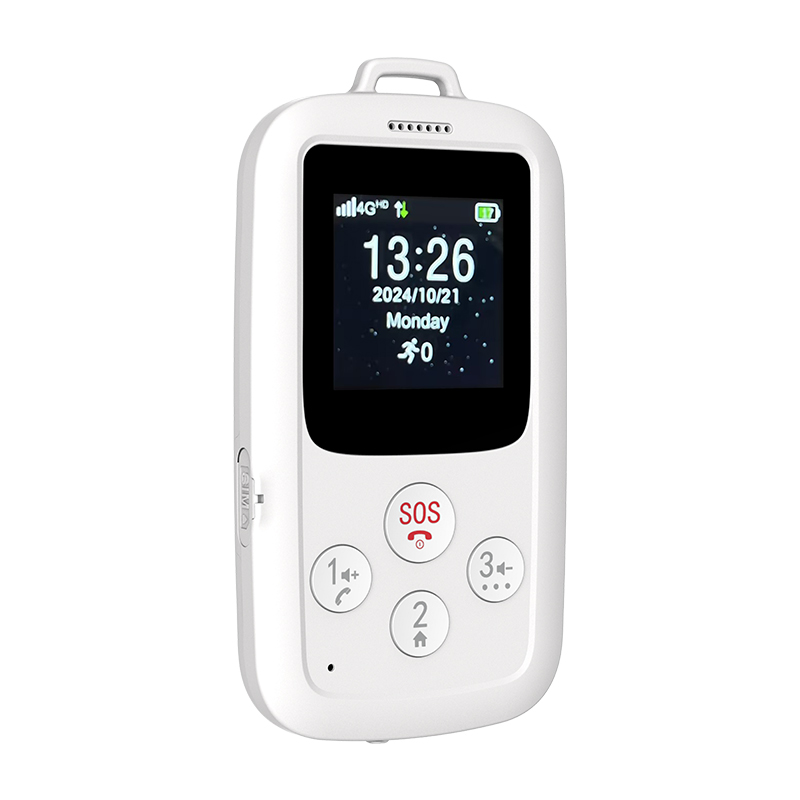
For young children, wearable technology provides the safest entry point. A dedicated 4G Smart Watch offers tremendous peace of mind for anxious parents.
Core Function: These devices provide closed-loop communication and precise location monitoring.
Pros: The watch remains securely attached to the child. This makes it incredibly hard to lose. They feature highly restricted contact lists. Only pre-approved numbers can call in or out. Most importantly, these watches offer zero access to social media or open web browsing.
Outcomes: This hardware delivers parent-focused security. You always know where they are. Meanwhile, you avoid exposing the child to dopamine-driven applications.
As children enter middle school, they crave more independence. They might reject a brightly colored watch. However, they are still not ready for the open internet.
Core Function: These devices offer basic independence. They support voice calls, text messaging, and location tracking.
Pros: A Kids GPS Tracker or a basic feature phone mimics the form factor of an adult device. This satisfies their social desires. Yet, it entirely lacks an app store or web browser. The device focuses purely on utility rather than entertainment.
Outcomes: This category bridges the gap between childhood wearables and teenage independence. It allows you to introduce texting etiquette in a completely low-risk environment.
Teenagers eventually need full communication tools. They need access to school apps and social connectivity. Here, parents face a crucial hardware choice.
Core Function: These devices provide full communication with graduated digital access.
Pros and Cons: Giving a child an adult smartphone with parental controls requires constant administrative vigilance. Kids often bypass Apple Screen Time or Google Family Link. Conversely, a purpose-built kids phone offers an operating system designed specifically for safety. These operating systems block clever workarounds. They filter inappropriate content automatically at the network level.
Outcomes: This approach provides necessary social connectivity. At the same time, it maintains foundational safety nets that protect vulnerable teens.
Developmental Stage | Recommended Hardware Category | Core Functionality | Web & App Store Access |
|---|---|---|---|
Pre-K to Early Elementary | Smart Watch | Location monitoring, approved calls | None |
Tweens (Middle School) | Basic Talk/Text Device or GPS Tracker | Basic communication, texting etiquette | None |
Teens (High School) | Purpose-Built Safe Smartphone | Graduated digital access, school apps | Strictly filtered / Gradual release |
Not all devices offer the same level of protection. Once you identify the right hardware category, you must evaluate the underlying software. You must scrutinize how these companies handle your family's sensitive information.
Device security matters just as much as physical safety. You must understand how the device and its associated applications handle child data. The Children's Online Privacy Protection Act (COPPA) sets strict standards in the United States. You should verify that any hardware you choose explicitly complies with these regulations. We strongly warn against purchasing cheap, third-party devices from unknown brands. These generic devices often feature insecure default passwords. They frequently transmit unencrypted location data across vulnerable networks. Protecting your child's physical location requires investing in verifiable digital security.
Before purchasing, clearly define what outcomes you want. Then, evaluate features against those specific goals.
If your primary goal is location tracking, you must evaluate the GPS accuracy. Check how quickly the geofencing alerts notify you when they leave a designated safe zone.
If your primary goal is safe communication, evaluate the spam-blocking capabilities. Ensure the system utilizes strict whitelist-only contact settings. This means strangers simply cannot reach your child.
Children grow quickly. Their digital needs will change rapidly over a few short years. You must evaluate whether the device can adapt. Can the parental control software scale alongside their maturity? The best platforms allow you to loosen restrictions gradually. For example, you might start by allowing only phone calls. A year later, you might add YouTube Kids or extend daily screen time limits. A scalable device prevents you from needing to buy entirely new hardware every year as they demonstrate ongoing responsibility.
Handing over the hardware represents only the beginning of the journey. Many parents struggle because they misunderstand the ongoing requirements of digital parenting. You must build a robust infrastructure around the device.
You must acknowledge a difficult truth. Hardware controls and software filters cannot substitute for active, engaged parenting. Technology workarounds are incredibly common among motivated children. They will find ways to guess passwords or bypass screen time limits. You cannot simply hand them the device and assume the software will do all the heavy lifting. You must frequently audit the device. You must check their messages and review their application usage history. Active supervision remains your strongest defense.
Successful deployment requires hardcoded limitations. You must establish transparent assumptions before the device is ever handed over. We recommend drafting a formal device contract. Both you and your child should sign it.
Device Ownership: The contract must clearly state that the parent owns the device. The child is merely borrowing it.
Clear Consequences: Define the exact consequences for broken rules. What happens if they bypass screen time limits? What occurs if they hide passwords? The punishment should be known beforehand.
Mandatory Offline Zones: Establish strict physical boundaries. For example, ban all devices in bedrooms overnight. Prohibit phones at the family dinner table.
You must discuss dark topics before they actually happen. Sit down and talk about cyberbullying. Discuss the inevitable exposure to inappropriate content. Explain the very real risks of online predators. You want to frame yourself as an ally and a safe harbor. If they stumble across something terrifying online, they should run to you, not hide from you. If you act strictly as a punisher, they will delete their browser history and suffer in silence.
You now understand the behavioral requirements and the hardware categories. It is time to make a practical decision. Follow this simple logic to shortlist your options and execute a safe rollout.
Step 1: Match Age to Phase. Look back at the Readiness Framework. Select the hardware category (Watch, Feature Phone, or Smartphone) that correctly matches their behavioral maturity.
Step 2: Audit Your Ecosystem. Determine how the new hardware fits into your current life. Does the child's device need to integrate seamlessly with the parents' operating system? Ensure the tracking capabilities function well on your personal smartphone.
Step 3: Review Carrier Logistics. Evaluate your network options. Decide whether you should add a line to an existing family plan. Alternatively, you might purchase a standalone subscription tailored specifically for the new device.
Step 4: Execute the Trial Period. Treat the first thirty days as a strict probationary rollout. Use this time to test boundaries. Evaluate the device's utility. Ensure the child actually follows the behavioral contract. You can always revoke the privilege if they fail the trial.
Introducing a connected device is a phased transition, not a one-time event. You must gradually increase access as trust builds.
Prioritizing a secure, highly restricted device initially provides the safest possible environment. It allows them to learn basic digital citizenship without severe risks.
Focus heavily on establishing mandatory offline zones and behavioral contracts early on. These habits will protect them later in life.
Actively supervise their digital life. Software filters offer helpful nets, but parent involvement remains the ultimate safeguard.
Take action today by writing out a device contract before you browse for new hardware. Establish your family's boundaries first.
A: It depends entirely on your hardware choice. Chronologically, 8 is generally too early for an unrestricted smartphone. However, it is an appropriate age for a secure wearable device. If they walk to school or attend after-school programs, a wearable keeps them connected safely.
A: Handing down an old smartphone presents hidden dangers. Even without cellular service, Wi-Fi-only access allows them to download unmonitored messaging apps. It is incredibly difficult to fully sanitize an adult device. Purpose-built hardware provides a much safer foundation for young users.
A: Standard communication features differ greatly from stealth listening tools. Reputable devices avoid privacy-invasive "stealth" listening features due to strict legal and ethical considerations. You should rely on open communication and reliable location pinging rather than secret surveillance.
A: App-level restrictions on adult devices are easily bypassed by tech-savvy kids. If this happens, you should revoke device access temporarily. We strongly advise relying on network-level controls or purpose-built operating systems. These specialized systems are specifically designed to block common technological workarounds.