Views: 0 Author: Site Editor Publish Time: 2026-07-14 Origin: Site
Traditional copper landlines, widely known as POTS, are rapidly phasing out across the globe. Concurrently, internet-dependent VoIP systems leave users vulnerable. They frequently fail when broadband connections drop or sudden power outages occur. A Fixed Wireless Phone elegantly resolves this communication gap. This device uses cellular networks via a standard SIM card. It delivers a familiar, reliable landline experience without relying on aging physical wires.
Selecting the best model requires careful consideration and planning. This comprehensive guide helps buyers navigate essential factors like carrier compatibility, hardware specifications, and environmental limitations. You will understand how to evaluate cellular signal strength, battery backups, and seamless hardware integrations. Ultimately, you will gain the knowledge needed to select a robust fixed wireless system. This ensures you maintain dependable communication tailored precisely for your residential or commercial daily needs.
Carrier Agnosticism vs. Locked Devices: Unlocked fixed wireless terminals offer long-term flexibility, while carrier-locked devices often provide easier initial setup but limit network switching.
Hardware Compatibility: Standard RJ11 ports are required to bridge fixed wireless bases with existing DECT 6.0 cordless phone systems.
Power Resiliency: A built-in battery backup is non-negotiable for maintaining communications during power outages—a primary reason buyers seek fixed wireless alternatives to VoIP.
Data Limitations: Fixed wireless voice services use cellular compression, making them generally incompatible with legacy fax machines, credit card terminals, and medical alert systems.
Telecommunications infrastructure is undergoing a massive transformation. Providers are actively retiring degraded copper wire networks. Legacy line maintenance becomes increasingly difficult as replacement parts disappear. Many consumers initially shifted toward VoIP (Voice over Internet Protocol) solutions. However, VoIP presents a significant flaw. It relies entirely on continuous, stable broadband access.
When storms knock out local internet nodes, VoIP phones stop working. Routers lose power, severing your connection to emergency services. Fixed wireless technology offers a strategic alternative. It bypasses vulnerable local wired infrastructure entirely. Instead, these devices leverage robust 4G LTE and 5G cellular networks. Cell towers typically maintain massive backup generators. They remain operational during regional power grids failures.
You must understand the trust factor and inherent limitations here. Transparency matters when replacing critical infrastructure. Fixed wireless networks provide exceptional voice clarity through VoLTE (Voice over LTE). However, they are not 1:1 replacements for high-baud-rate analog data transmission. Cellular networks compress audio signals efficiently for human speech. This digital compression distorts the specific tones required by older equipment. Legacy fax machines, monitored home security alarms, and medical alert pendants generally fail over cellular voice networks. You must plan alternative internet-based solutions for those specific data endpoints.
Buying criteria differ drastically depending on your environment. A single household has vastly different communication needs compared to an active construction site. Identifying your distinct persona streamlines the hardware selection process.
Many home users simply want to cut their expensive landline cord. They also desire familiar ergonomics. Ease of use remains paramount for senior users. They benefit from large button interfaces and backlit displays. Seamless integration into existing multi-handset home systems is another major priority. You want to place handsets in the bedroom, kitchen, and garage. Furthermore, residential users face relentless spam calls. An emphasis on robust call-blocking features helps filter unwanted telemarketers.
Business environments demand rugged flexibility. Offices often require multi-line capabilities. They need PBX system integration to route calls between departments. Desk-phone form factors look professional and feature dedicated transfer buttons. Portability represents another massive advantage for businesses. Construction teams establish pop-up offices frequently. Event organizers deploy mobile command centers in empty fields. You can simply plug a fixed wireless terminal into a generator and establish immediate voice communications.
Common Mistake: Buying a residential-grade unit for a high-volume office. Residential terminals often overheat or drop calls if subjected to constant, simultaneous multi-line dialing.
Requirement Dimension | Residential Focus | Commercial Focus |
|---|---|---|
Form Factor | Terminal base linked to cordless handsets | All-in-one desk phone or multi-line PBX hub |
Key Features | Large buttons, spam blocking, HAC compliance | Call forwarding, hold functions, PBX integration |
Portability Need | Low (stays in one home location) | High (moves between job sites or events) |
Line Capacity | Typically single line | Multi-line capability |
Navigating hardware specifications requires a structured approach. You must evaluate internal components before making a purchase. This comprehensive fixed wireless phone buying guide highlights the four critical dimensions you should assess.
Network Compatibility and VoLTE Support: You must verify 4G LTE and 5G band support. Your local carrier utilizes specific radio frequencies. The device must support those exact bands. Also, evaluate unlocked models versus carrier-subsidized hubs. Unlocked units allow you to swap SIM cards if you find better reception elsewhere. Carrier-locked models limit your ability to switch networks easily. Always ensure the device explicitly supports VoLTE. Older 3G networks are permanently offline.
Antenna Architecture and Signal Strength: Assess internal versus external antennas. Internal antennas look sleek but struggle in rural locations. We recommend models featuring external, detachable antennas. Devices incorporating standard SMA connectors provide excellent flexibility. They allow you to attach high-gain outdoor antennas. This upgrades your signal reception dramatically in low-signal areas.
Battery Backup Capacity: Grid failures happen unexpectedly. Benchmarking standby time and talk time during power outages is vital. Look closely at the battery milliamp-hour (mAh) rating. We recommend a minimum 12-hour standby and 2-hour talk time. This ensures you maintain emergency readiness during prolonged weather events.
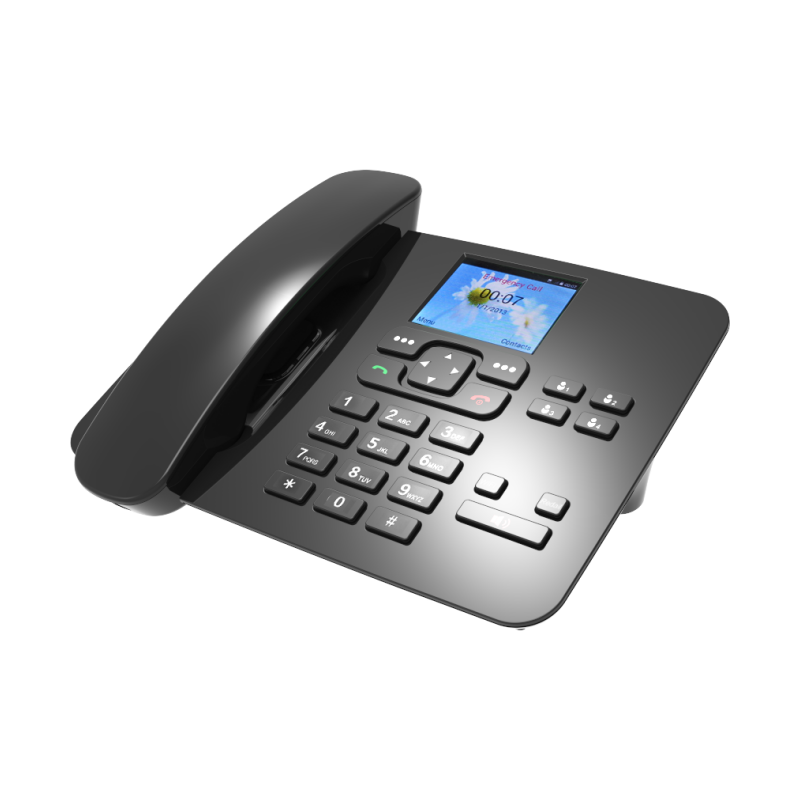
Device Form Factor: Choose between two primary designs. An "All-in-One Desk Phone" looks exactly like an office phone. You insert the SIM card directly into its chassis. Conversely, a "Fixed Wireless Terminal" acts as a bridge hub. You insert the SIM into the hub. Then, you plug standard analog landline phones into it. Terminals work best if you already own high-quality handsets.
Your new cellular hub must communicate flawlessly with your existing equipment. Failing to check port compatibility leads to frustrating installation delays.
Many households own multi-handset cordless systems. These systems utilize DECT 6.0 technology. Ensure your new fixed wireless base can power these standard cordless ecosystems. The cellular radio frequencies must not cause electromagnetic interference. High-quality terminals isolate their cellular antennas. This prevents the annoying buzzing sound often heard on poorly shielded phones.
Check the back panel of the unit carefully. You should look for dual RJ11 telephone ports. Two ports allow you to connect multiple phone bases or a secondary device. Some modern terminals also double as internet routers. If you need mobile broadband, verify the unit includes standard RJ45 ethernet ports. You can connect your laptop directly to the terminal for stable internet access.
Voice clarity dictates user satisfaction. Evaluate the device for active noise cancellation features. This suppresses background static during cellular transmission. HD voice compatibility ensures conversations sound natural and crisp. For residential models, always check the Hearing Aid Compatibility (HAC) ratings. A high HAC rating ensures the speaker does not cause painful feedback loops in modern hearing aids.
Best Practice: Always use high-quality, heavily shielded RJ11 cables. Short, premium cables reduce analog noise between the terminal and your handset base.
Even the best hardware fails if deployed incorrectly. You must understand environmental constraints and administrative hurdles before setting up your system.
Successful installation requires strategic placement. Cellular signals struggle to penetrate thick concrete walls or metal roofs. Base units must sit near a window or external wall. This ensures optimal cellular reception. Unfortunately, this optimal location may not align with your preferred phone placement. You might want your phone in the central hallway. However, the terminal might only get a signal in the living room window. Using a terminal combined with DECT 6.0 cordless handsets solves this issue. You leave the base at the window and carry the handset anywhere.
Most users want to keep their existing phone number. The FCC mandates number portability. However, you must understand the timeline and risks. Porting an existing landline number to a cellular fixed wireless plan takes time. The process usually takes between three and seven business days. During this transition, your line might experience temporary routing glitches. Never cancel your old landline service until the porting process finishes completely.
Emergency services track fixed wireless locations differently than traditional landlines. Traditional lines provide an exact physical address to dispatchers automatically. Fixed wireless phones operate on cellular networks. Dispatchers track them via cell tower triangulation. This provides an approximate location rather than an exact apartment number. You must update your E911 registered address directly with your cellular carrier. Keep this address perfectly accurate. If you move the terminal to a new office, update the E911 address immediately online.
You now understand the technical requirements. It is time to finalize your hardware selection. Follow this systematic approach to guarantee a successful deployment.
Audit Your Coverage: Test cellular signal strength at the intended installation site. Do not rely on coverage maps. Invite friends over. Check their mobile phone reception across major carriers. Commit to a device and carrier only after verifying strong indoor signal bars.
List Legacy Devices: Inventory every analog device currently plugged into your phone jacks. Document existing fax machines, dial-up alarm panels, or point-of-sale systems. If these are present, you must plan parallel hybrid solutions. You may need an internet-based fax service or a cellular upgrade module for your alarm.
Select the Hardware: Review your persona. Choose between a terminal or a standalone SIM-enabled desk phone. If you have expensive cordless handsets, buy a terminal. If you are setting up a temporary remote office, buy the all-in-one desk phone.
Verify the Battery: Double-check the technical manual. Ensure the internal battery is easily replaceable. Lithium-ion batteries degrade over a few years. You want a unit that accepts standard replacement packs.
Navigating the transition away from physical copper lines feels intimidating initially. However, the right fixed wireless phone gracefully balances cellular network reliability with familiar landline ergonomics. By bypassing vulnerable local wired infrastructure, you secure a more resilient communication method. You ensure connectivity even when neighborhood broadband fails.
Take time to audit your indoor cellular coverage before purchasing. Evaluate whether your home or business requires an all-in-one desk phone or a flexible terminal base. Encourage yourself to prioritize robust battery backups and antenna upgradeability. Removable SMA antennas future-proof your communication setup against poor signal environments. By following these structured guidelines, you will successfully deploy a dependable, long-lasting voice solution for any environment.
A: Yes. Standard FCC number porting rules apply to these transitions. You can absolutely transfer your old number. However, landline-to-wireless ports take longer than mobile-to-mobile ports. Expect the process to take 3–7 business days. Do not cancel your old service until the new SIM card rings successfully.
A: No. They communicate directly with local cellular towers via an inserted SIM card. They function completely independently of your home internet or Wi-Fi router. This makes them highly reliable during local broadband outages.
A: Yes. You can connect them provided the fixed wireless terminal features standard RJ11 telephone jacks. You simply plug the main base station of your cordless phone system into the terminal. All remote handsets will ring normally.
A: Usually not. Cellular voice networks use digital audio compression. This compression frequently distorts the sensitive analog data signals required by older fax machines and legacy alarm systems. You should seek specialized cellular modules for those specific devices.