Views: 0 Author: Site Editor Publish Time: 2026-07-06 Origin: Site
Today, shifting from legacy PBX networks to modern cloud communications is no longer just a digital trend. It represents an absolute operational necessity for businesses wanting agile, reliable workflows. For decades, companies relied exclusively on traditional copper-wire systems to route calls through central exchanges. Now, internet-based routing has completely transformed how voice data travels across the globe. You might assume this mandatory upgrade merely cuts monthly telecom bills. However, a modern VoIP phone represents much more than a simple cost-saving tool. It functions as a highly capable networked endpoint. This critical endpoint determines exactly how reliably and securely your entire team communicates on a daily basis. In this guide, you will learn the underlying mechanics of voice over IP technology. We will explore exactly why modern enterprises actively abandon outdated hardware infrastructure. We will also break down how to properly evaluate smart endpoints to future-proof your office environment.
VoIP phones convert analog audio into digital data packets transmitted over a business’s existing internet connection.
Replacing legacy PBX with VoIP typically yields verifiable cost reductions in long-distance routing and hardware maintenance.
Hardware endpoints have evolved; businesses now choose between standard SIP hardware, software applications (softphones), and advanced smart devices like an Android IP Phone.
Successful implementation requires assessing network readiness, specifically bandwidth availability, Quality of Service (QoS) router configurations, and PoE (Power over Ethernet) infrastructure.
Let us define the core concept clearly before diving into technical details. A VoIP (Voice over Internet Protocol) phone is a specialized hardware device or software program built specifically to transmit voice data via the internet. This stands in stark contrast to traditional landlines relying on physical copper wiring and regional exchanges. When you utilize one, you bypass legacy public switched telephone networks entirely. You leverage your existing broadband connection instead.
You must distinguish the physical hardware from the underlying digital protocol. VoIP refers to the actual internet-based technology moving voice data across global digital networks. Meanwhile, SIP (Session Initiation Protocol) is the specific set of standardized rules initiating, managing, and terminating those digital calls. The physical phone sitting on your desk acts merely as the user interface for these powerful background protocols. The hardware translates human interaction into digital commands.
Form factors vary widely based on specific user needs and office environments. They generally fall into a few distinct categories:
Traditional IP Desk Phones: These feature familiar numeric keypads, handsets, and standard LCD screens.
Softphones: These are software applications running natively on your existing computer or smartphone.
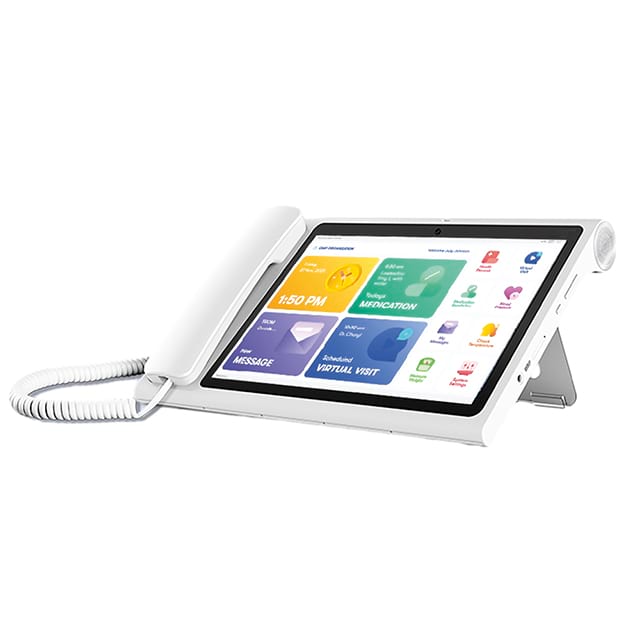
Smart Endpoints: These encompass modern, high-end touchscreens bridging the functional gap between tablet computers and standard voice receivers.
Understanding the internal mechanics helps IT teams troubleshoot network issues much more effectively. The technology functions through a highly orchestrated sequence of digital events. It happens almost instantly behind the scenes. We can break this complex technical process into three simplified steps.
Conversion: When you speak into the handset, the hardware utilizes specialized audio codecs, such as G.711 or G.722. These internal algorithms instantly convert your continuous analog voice signals into highly compressed digital data packets.
Transmission: These outgoing digital packets travel rapidly through your local area network. They use SIP to find the most efficient route across the broader internet. They travel directly to your designated cloud PBX provider's servers.
Reassembly: Once the packets reach their final destination, the receiver's network unzips them. Jitter buffers sequence the data correctly. The hardware then reassembles the packets into crisp analog audio. The entire journey happens with mere millisecond latency.
Despite this incredible efficiency, these digital systems carry strict infrastructure dependencies. Your overall call quality relies entirely on local network stability. We must acknowledge an unavoidable reality regarding cloud communications. If your office internet goes down, your VoIP system goes down simultaneously. You lose dial tone immediately. However, you can mitigate this risk easily. Modern platform providers allow administrators to establish automatic failover routing. If the primary broadband connection drops unexpectedly, the cloud system seamlessly routes incoming business calls directly to employee mobile devices.
Companies do not move away from on-premise PBX systems simply because cloud technology feels more modern. They demand concrete operational outcomes. We see direct impacts on daily agility, financial structuring, and software workflow integration.
The traditional on-premise PBX model historically required massive capital expenditure (CapEx). Companies bought expensive, bulky servers. They continuously paid certified technicians for routine maintenance and manual system updates. Cloud communications shift this financial dynamic entirely toward predictable operational expenditure (OpEx). You pay a flat, subscription-based monthly fee per user. The cloud provider handles all backend server upkeep, security patches, and system upgrades remotely.
Scalability and provisioning also drive this mass migration. Corporate growth used to require intensive physical labor. Adding new employees meant technicians wiring new phone lines through office walls. Now, IT administrators handle user provisioning instantly. They simply log into a centralized web portal. They can add or remove user extensions, reassign numbers, and adjust permissions in minutes without leaving their desks.
Modern networks introduce true Unified Communications (UCaaS). A modern voice setup seamlessly consolidates multiple independent communication channels. It unifies external voice calls, SMS text messaging, internal team chat, CRM customer data, and video conferencing into one single data stream. You no longer juggle five different desktop applications to manage a single client relationship.
Finally, the shift guarantees remote work flexibility. The modern workforce demands absolute location independence. Cloud-based endpoints allow employees to take their exact office extension anywhere. As long as they maintain an active internet connection, their outgoing caller ID remains identical to the corporate headquarters. Clients never know if an account manager is calling from the main office or a home workspace.
Choosing the right hardware ultimately dictates how effectively your team utilizes the new network capabilities. Not every employee requires the same level of functionality. Endpoints generally fall into three distinct solution categories. You must evaluate them carefully to maximize productivity.
Standard SIP phones serve as the reliable backbone for basic daily communication needs. These devices are perfect for shared common areas, busy warehouse floors, or low-call-volume desks. They act as highly reliable, single-purpose devices meant purely for handling standard audio calls. They offer durability and simplicity without unnecessary software distractions.
Conversely, softphones offer unmatched versatility. Software-based desktop and mobile applications are ideal for remote workers. Highly mobile employees often prefer utilizing dedicated software on their existing laptops. They simply plug in a comfortable USB headset. This method reduces physical clutter and allows seamless travel.
However, standard models and softphones sometimes fall short for intensive power users. Modern receptionists, dispatchers, and corporate executives require advanced functionality right at their fingertips. The smart hardware evolution addresses this specific market gap. This is where the Android IP Phone enters the modern workspace as a premier endpoint solution. It brings the familiar, app-driven interface of a consumer mobile device directly to the traditional office desktop.
We must explore how an Android Desk Phone radically transforms workflow efficiency. These advanced devices natively support proprietary business applications. They allow direct CRM integrations, email access, and secure web browsing right from the receiver's screen. You essentially place a dedicated, highly specialized mini-computer on your desk. This reduces the constant need to switch between the physical phone and the desktop monitor.
For visually demanding communication workflows, the Android Touch Screen IP Phone offers unmatched utility. It features built-in high-definition video conferencing capabilities without requiring a separate PC setup. Power users enjoy one-touch call routing, drag-and-drop extension transfers, and highly intuitive visual voicemail management. These integrated smart features drastically reduce call handling times for busy front-desk operators and executive assistants.
Endpoint Hardware Comparison
Endpoint Type | Ideal User Profile | Key Strengths | Complexity Level |
|---|---|---|---|
Standard SIP Phone | Warehouse, Common Areas, Support | High reliability, durable, simple audio calls | Low |
Softphone Application | Remote Workers, Sales Travelers | Zero hardware footprint, highly portable | Medium |
Android Smart Phone | Executives, Receptionists, Power Users | Video conferencing, CRM app integration, visual routing | High |
Upgrading your physical endpoints only works if your underlying local infrastructure fully supports them. Operational bottlenecks usually stem from poor initial network preparation. You must audit your local IT environment before deploying new cloud hardware.
Voice data requires consistent, dedicated bandwidth to function properly. A universally accepted baseline metric requires roughly 100 kbps of both upload and download speed per concurrent active call. While this requirement sounds minimal, heavy office usage adds up fast. Sufficient, uncongested bandwidth prevents frustrating audio jitter, packet loss, and noticeable conversation latency.
Standard network routers treat all incoming and outgoing data equally by default. This causes major audio problems. If an employee downloads a massive software update, your voice packets get delayed in the general router queue. You must configure Quality of Service (QoS) rules manually on your company router. Proper QoS configurations guarantee that live voice traffic always receives strict transmission priority over general data transfers.
Look at a modern office communication setup. You will likely notice a missing electrical cable. Most contemporary devices do not use standard AC wall adapters. Instead, they draw necessary electrical power directly through the Ethernet cable. This technology relies on PoE (Power over Ethernet) network switches. Upgrading your IT closet to PoE switches simplifies desk wiring immensely and centralizes power backup strategies.
Finally, we must address security and compliance. Voice data packets travel across the public internet constantly. Consequently, they remain highly vulnerable to malicious interception if left completely unencrypted. You must evaluate telecom providers offering robust end-to-end encryption protocols, specifically SRTP (Secure Real-Time Transport Protocol) and TLS. Furthermore, ensure the vendor maintains strict compliance certifications covering industry standards like HIPAA or SOC 2 if you operate in highly regulated sectors.
Choosing the right digital communication system requires careful alignment between modern technology and daily employee workflows. You must match specific hardware capabilities directly to individual user roles. Supplying standard SIP devices to warehouse staff while equipping executives with advanced touch screens ensures optimal productivity. A generic, one-size-fits-all hardware approach rarely yields the best operational results.
Your immediate next step involves rigorously assessing your current office infrastructure. Run a comprehensive network speed and latency test during peak business hours. Audit your existing telecom monthly spending to understand baseline operational expenses. Once you secure sufficient local bandwidth and outline exact user hardware needs, you can confidently begin shortlisting reputable cloud vendors for deployment.
A: No, these modern devices require an active internet connection to transmit digital data packets. If your local office network experiences an outage, the physical desk unit will not place or receive calls. However, cloud providers offer automated cellular failover solutions. You can easily configure the system to forward incoming business calls directly to mobile devices during emergencies.
A: Not necessarily. You have multiple transition options available. You can purchase Analog Telephone Adapters (ATAs) to connect legacy copper-wire endpoints to the internet. Alternatively, you can bypass dedicated hardware entirely by utilizing softphone applications installed on existing laptops. However, buying modern IP devices generally provides the most reliable and feature-rich daily experience.
A: It rarely causes any noticeable network slowdowns. Voice calls consume very little bandwidth, typically hovering around 100 kbps per active line. Furthermore, many modern IP models feature Gigabit Ethernet passthrough ports. This design allows you to daisy-chain your desktop computer through the phone using a single wall jack without restricting your overall download speed.
A: Yes, you can absolutely retain your existing contact numbers. The telecommunications industry utilizes a highly regulated process called Local Number Portability (LNP). When you select a new cloud provider, they submit a formal porting request to your old carrier. This process transfers your exact digits to the new digital network seamlessly without disrupting client communications.